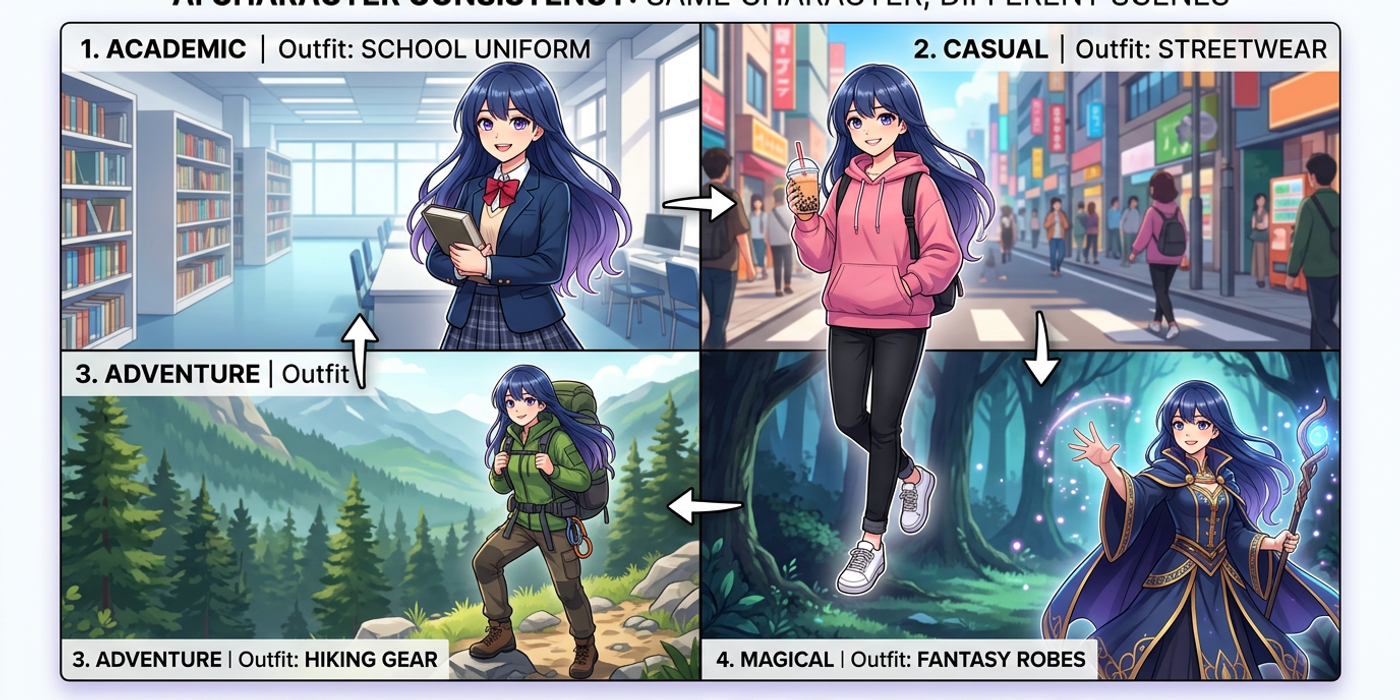
Struggling to keep your AI characters looking the same across generations? Learn proven techniques for character consistency — from IP-Adapter to reference images and prompt anchoring.
One of the biggest frustrations with AI image generation is the inconsistency. You generate a perfect character portrait — great face, right outfit, consistent style — then try to put them in a new pose or scene, and suddenly they look like a completely different person. Hair colour changes. Facial structure shifts. The vibe is gone.
This is the character consistency problem, and it's the single biggest barrier stopping creators and agencies from using AI image generation for real production work. Without consistency, you can't build a brand, tell a visual story, or produce a cohesive campaign.
The good news? There are now several reliable techniques to maintain character consistency across multiple AI generations. This tutorial walks through the most effective approaches in 2026.
What Makes Character Consistency So Hard
AI image models generate images from pure noise — every generation starts from a random seed. Even with the same prompt, the model introduces subtle (and sometimes not-so-subtle) variations. Factors that cause inconsistency include:
- Seed differences — each new seed produces a different arrangement of noise - Prompt drift — slight word order changes affect how the model distributes attention - Model randomness — sampling temperature and CFG scale introduce stochastic variation - No facial memory — standard text-to-image models have no concept of "this person's face"
Understanding these root causes helps you choose the right solution.
Technique 1: Reference Image Conditioning (IP-Adapter)
IP-Adapter (Image Prompt Adapter) is currently the most reliable method for character consistency. Instead of describing the character with text alone, you feed the model a reference image of the character, and the adapter extracts visual features — face structure, skin tone, hair, clothing style — and conditions the generation on them.
How to use it with Cooly Studio:
1. Upload a reference portrait of your character (front-facing, neutral expression, good lighting works best) 2. Set the IP-Adapter weight between 0.5–0.8 (lower = more prompt control, higher = more reference fidelity) 3. Write your scene prompt as normal 4. The model blends the reference features with the new scene description
Pro tip: Use 3-4 reference images of the same character from different angles for the best results. Cooly Studio's multi-reference input lets you stack them.
Technique 2: Face Swap / Inpainting
For scenarios where you need absolute facial consistency — say, a specific actor or brand ambassador — the most reliable approach is to generate the scene or body first, then face-swap or inpaint the character's face onto it.
The workflow: 1. Generate the full scene with a approximate character (use a body type and clothing description) 2. Crop to the face region 3. Use a face-swap model (like Ground Truth or ReActor) to paste the character's face onto the generated face 4. Inpaint any seam issues at the jawline or hairline
This is the same technique professional studios use. It's more work per image, but the consistency is perfect — the face is literally the same pixels every time.
Technique 3: Prompt Anchoring and Seed Locking
Before you had reference-image techniques, prompt engineers relied on three tricks that still work well today:
Seed locking: Every AI generation has a seed number. Once you find a seed that produces your character's face well, reuse that exact seed for every generation of that character. The model starts from the same noise pattern, and the same prompt + same seed = very similar faces.
Prompt anchoring: Build a "character anchor block" — a 2-3 sentence paragraph at the start of every prompt that describes the character in obsessive detail. Not just "a woman with brown hair" but:
"A 28-year-old East Asian woman with long straight black hair, light brown eyes, defined cheekbones, straight nose, full lips, fair skin with warm undertones, wearing a red blazer and white silk blouse."
Every generation gets the exact same anchor, then the scene-specific instructions follow.
CFG scale tuning: Lower CFG scale (5–7) gives the model more creative freedom but less consistency. Higher CFG (9–12) forces the model to follow your prompt more strictly — including your character description — but can reduce image quality. For character work, start at 8 and adjust.
Technique 4: LoRA and Fine-Tuning
If you need to generate a specific character across dozens or hundreds of images — for example, a brand mascot or a recurring webcomic character — the professional solution is a LoRA (Low-Rank Adaptation).
LoRAs are small model files (typically 5-20 MB) that "teach" the image model a new concept — in this case, your character's face, style, and proportions. Once trained, you load the LoRA alongside your base model and call the character by name in your prompt.
When to use LoRA: - You need 50+ consistent generations of the same character - Professional production work (ad campaigns, animations, comics) - Multiple characters that need to coexist consistently
Cooly Studio supports LoRA loading on compatible models. Training a LoRA takes about 20-30 minutes on consumer hardware and costs roughly 5-10 credits worth of compute.
Technique 5: Image-to-Image with Consistent Noise
Image-to-image (img2img) workflows let you start from an existing image and "tilt" it toward a new description. With the right settings, you can change the background, pose, or expression while preserving the character's identity.
The trick is denoising strength: Keep it between 0.3–0.45. Higher values change too much (you lose the character), lower values change too little (the scene barely shifts). Combine img2img with IP-Adapter for a two-layer consistency lock.
Choosing the Right Technique
| Use Case | Best Technique | Setup Time | Consistency | |---|---|---|---| | Quick social media posts | Reference + IP-Adapter | 1 min | Good | | Campaign with known talent | Face swap pipeline | 5 min | Perfect | | Recurring brand character | Prompt anchor + seed lock | Instant | Moderate | | Long-term brand mascot | Custom LoRA | 30 min | Excellent | | Complex scene changes | Img2img + IP-Adapter | 2 min | Very Good |
Frequently Asked Questions
Q: Why does my AI character change ethnicity or skin tone between generations? A: This usually happens because the prompt doesn't anchor appearance tightly enough. Add a detailed physical description block (skin tone, eye shape, hair texture, bone structure) to every prompt. Reference images via IP-Adapter or face swap are the guaranteed fix.
Q: Can I use the same character in different outfits with consistent faces? A: Yes. The most reliable approach is to generate the character in the new outfit while using IP-Adapter with a face-only crop of your reference image. The adapter transfers facial features without imposing the old outfit's visual style.
Q: How many reference images do I need for good IP-Adapter results? A: One good front-facing reference works, but three images (front, three-quarter, profile) give significantly better results across different angles. Avoid reference images with heavy shadows or filters that obscure facial structure.
Q: Does seed locking work across different AI models? A: No — seed values are model-specific. A seed that works in Seedream 4 will produce completely different results in Nano Banana 2 or Flux Schnell. You need separate seed locks per model.
Q: What's the best image model for character consistency? A: In 2026, Seedream 4 leads for facial consistency thanks to its improved cross-attention layers. Nano Banana 2 is close behind and faster. For absolute consistency, combine either with IP-Adapter rather than relying on the base model alone.
Q: Can I generate the same character in different art styles? A: Yes, but it requires a two-step workflow. First, generate the character in a neutral photographic style using IP-Adapter or face swap. Then, run that output through img2img with a style LoRA at low denoising strength (0.3–0.4) to apply the new style while preserving the face.
Q: Does Cooly Studio support all these techniques? A: Cooly Studio supports IP-Adapter, multi-reference image inputs, seed locking, CFG tuning, img2img, and LoRA loading on compatible models — all from a single interface. No need to jump between different tools.
Q: How do I handle group shots with multiple consistent characters? A: Generate each character separately using their own reference and seed lock, then compose them in post-processing (Photoshop or ComfyUI). Some models support multi-conditioning with multiple LoRAs, but the quality drops with more than 2-3 characters in a single generation.