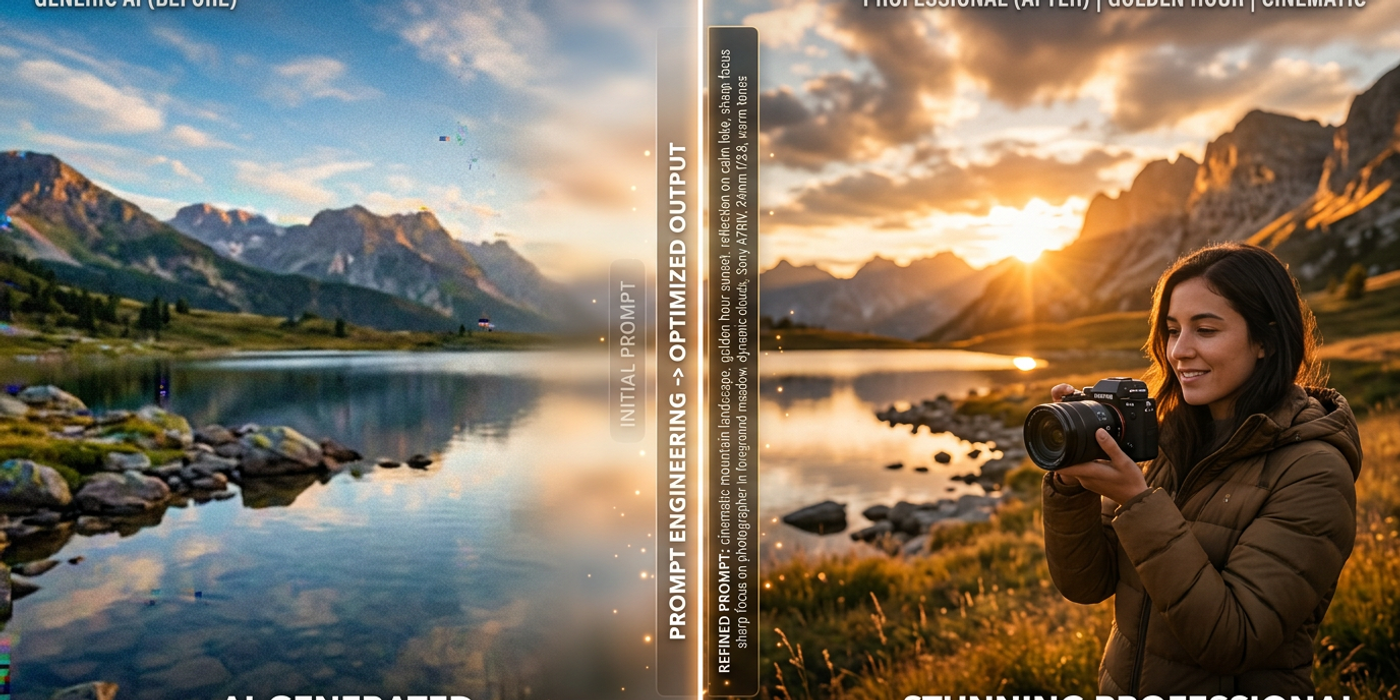
Master the art of AI image prompts in 2026. Learn how to structure effective prompts, use negative prompts, choose styles and lighting, and get consistent results with Seedream 4 and Nano Banana 2 on Cooly Studio.
Writing a good AI image prompt is like learning a new language — once you understand the grammar, your results transform overnight. In this guide, you'll learn exactly how to structure prompts, what details matter most, and how to get professional-quality images from tools like Seedream 4 and Nano Banana 2 on Cooly Studio.
Understand How AI Models Read Your Prompt
AI image models don't "see" your prompt the way a human artist would. They break every word and phrase into tokens, then match those tokens against patterns learned from millions of training images. That's why a prompt like "a dog" produces a generic result — it's too broad for the model to pin down a specific style or scene.
The key insight is that specificity is everything. Instead of "a dog," try "a golden retriever puppy sitting on a wooden porch, morning sunlight, shallow depth of field." Every additional detail constrains the model's output space, nudging it closer to exactly what you envisioned.
The Anatomy of a Perfect Prompt
A well-structured AI image prompt has four essential layers. When you include all four, your results become dramatically more consistent and professional.
1. Subject — What's the main focus? Be specific about the brand, model, action, and count. Instead of "a woman," try "a young woman in a cream linen dress holding a straw hat."
2. Environment — Where is the subject? Describe the background, setting, and atmosphere. "Standing in a lavender field at sunset, rolling hills in the distance."
3. Lighting and color — How is the scene lit? This is the layer most beginners skip and the one that adds the most polish. "Golden hour backlighting, warm amber tones, soft lens flare."
4. Style and medium — What aesthetic are you aiming for? "Cinematic photography, shallow depth of field, 35mm film grain, 8K."
Combine all four and you get something like: "A ceramic teapot with blue floral pattern on a rustic wooden table, warm afternoon sunlight streaming through a window, shallow depth of field, cinematic photography, 4K." Notice that every word pulls in a different direction — the model now has enough constraints to create something specific and usable.
Style, Medium, and Artist References
One of the most powerful techniques in prompt engineering is style referencing. You can describe an aesthetic directly and the model will replicate it with surprising accuracy.
Try these style cues in your next prompt:
- "in the style of Wes Anderson — symmetrical composition, pastel palette, wide angle" - "photorealistic macro shot, National Geographic documentary style" - "anime style, Studio Ghibli aesthetic, soft watercolor background"
Cooly Studio gives you access to multiple models with different strengths. Seedream 4 excels at photorealism and complex compositions, while Nano Banana 2 handles stylized and illustrative prompts beautifully. Picking the right model for your desired style is half the battle — match your prompt structure to the model's strengths and you'll save credits and iterations.
Lighting and Color: The Photography Fundamentals
Good lighting separates amateur-looking AI images from professional portfolio pieces. Here are lighting keywords to add to your prompts based on the effect you're after:
- Golden hour — Warm, flattering portraits. Add: "golden hour lighting, warm tones" - Soft diffused — Perfect for product photography. Add: "softbox lighting, even exposure" - Dramatic / chiaroscuro — Artistic, moody scenes. Add: "dramatic side lighting, deep shadows" - Cinematic — Storytelling scenes. Add: "cinematic lighting, volumetric rays" - Neon / cyberpunk — Futuristic aesthetics. Add: "neon lighting, purple and cyan tones"
Color temperature keywords like "warm," "cool," "vibrant," "muted," and "monochromatic" give the model strong signals about the final feel of your image. The combination of lighting type and color temperature is often the difference between an image that looks "AI-generated" and one that looks like it was shot by a professional photographer.
Advanced Techniques: Negative Prompts and Weighting
Most AI image models — including those available on Cooly Studio — support negative prompts. A negative prompt tells the model what you don't want in the image. This is the single highest-ROI habit you can build as a beginner:
Negative prompt: "blurry, low quality, distorted face, extra fingers, watermark, text, ugly, deformed, bad anatomy"
This alone eliminates most common AI artifacts like warped hands, garbled text, and weird facial features. Add a negative prompt to every generation and watch your usable output rate jump from 30% to 80%.
Some models also support prompt weighting — emphasizing certain words by wrapping them in parentheses or using numeric weights:
- (beautiful:1.3) — increases the influence of "beautiful" - (blurry:0.5) — decreases the influence of "blurry"
This gives you granular control over which parts of your prompt the model prioritizes. Use it when the model consistently under-weights an important element of your prompt.
Test, Iterate, and Refine
The best AI prompt engineers don't write perfect prompts on the first try — they iterate. A good workflow is:
1. Write a base prompt with all four layers 2. Generate a batch of 4 images 3. Identify what's working and what's missing 4. Adjust one variable at a time (lighting, style, negative prompt) 5. Repeat until the output matches your vision
Cooly Studio's batch generation feature makes this workflow fast and credit-efficient. You can tweak and regenerate until you get exactly what you need.
Frequently Asked Questions
Q: How long should my AI image prompt be? A: Aim for 50-100 words for detailed generations. Too short (under 10 words) gives the model too much freedom and produces generic results. Too long (over 200 words) can confuse the model or cause it to ignore important parts of the prompt.
Q: Should I use full sentences or keyword lists? A: A mix works best. Start with a clear sentence describing the subject and scene, then add comma-separated keywords for style, lighting, and technical parameters. This gives the model both sentence-level structure and specific visual cues.
Q: Why do my AI images sometimes have distorted hands or faces? A: Hand and face distortion is a known limitation of many AI models. Use negative prompts with terms like "extra fingers" and "bad anatomy." Choosing a model like Seedream 4 that handles anatomy better also helps significantly.
Q: Do different AI image models need different prompt styles? A: Yes. Seedream 4 responds well to detailed, descriptive English prompts with clear scene structure. Nano Banana 2 handles more artistic and abstract descriptions. The best approach is to tailor your prompt style to the model's strengths — test the same prompt across models on Cooly Studio to see which gives you the best result.
Q: What's the most common mistake beginners make with AI prompts? A: Being too vague. "A beautiful landscape" produces a generic result because every possible landscape is equally valid. Specificity — "a misty mountain lake at sunrise, pine forest in foreground, reflections in calm water" — is the fastest way to improve output quality.
Q: Should I include camera and lens specifications in my prompts? A: Yes, for photorealistic outputs. Terms like "35mm lens, f/1.8 aperture, shallow depth of field, ISO 100, shot on Sony A7IV" signal photographic conventions to the model and produce more realistic images with authentic lens characteristics.
Q: Can I use the same prompt on different models and get similar results? A: Not reliably. Each model interprets prompts differently based on its training data. A prompt that produces photorealistic output on Seedream 4 may give an illustrative result on Nano Banana 2. Test your prompts across models to find the best match for your desired aesthetic.