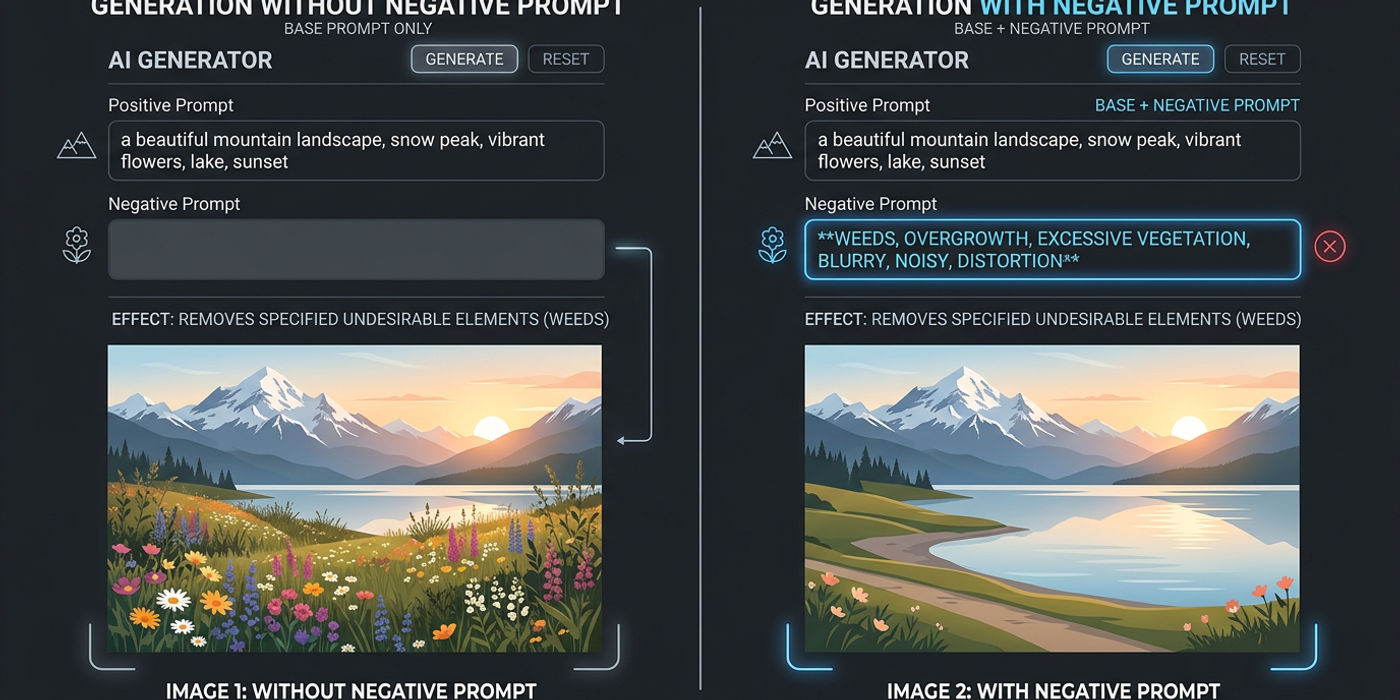
Negative prompts are one of the most powerful features in AI image generation — yet most beginners don't use them. Here's what they are, how they work, and how to master them.
Negative prompts are one of the most underrated tools in AI image generation. While most beginners focus on crafting the perfect positive prompt, seasoned users know that telling the AI what not to generate is just as important.
In this guide, you'll learn exactly what negative prompts are, how they work under the hood, and why mastering them will save you credits, time, and frustration.
What Is a Negative Prompt?
A negative prompt is a set of instructions telling an AI image model what you don't want in the output. While your main prompt describes the scene you want — "a serene mountain landscape at sunset" — the negative prompt weeds out unwanted elements like "blurry, distorted, extra fingers, bad anatomy."
Think of it as a filter. The AI model generates images by gradually removing noise from random pixels, guided by your positive prompt. The negative prompt adds a second layer of guidance: it actively steers the generation away from specific visual features. On Cooly Studio, you'll find the negative prompt field right below the main prompt box.
How Negative Prompts Actually Work
Diffusion models start with pure noise — random pixels — and iteratively refine it into a coherent image. At each step, the model predicts which direction leads toward your positive prompt. Through a technique called classifier-free guidance (CFG) scaling, the model computes two predictions — one for your positive prompt, one for your negative prompt — and moves toward the positive while steering away from the negative.
This dual guidance makes negative prompts so effective. Instead of hoping the model avoids bad anatomy or weird lighting, you're actively pushing it away from those outcomes.
Common Use Cases for Negative Prompts
Fix anatomy. AI models struggle with hands, fingers, and faces. Add "bad anatomy, extra fingers, deformed hands, missing fingers, mutated hands" to dramatically improve human figures.
Remove artifacts. Watermarks, text, JPEG compression noise, and oversaturated patches can creep in. Use "watermark, text, signature, logo, low quality, jpeg artifacts" to clean up.
Control style bleed. Unwanted anime eyes in a photorealistic portrait? Use "cartoon, anime, illustration, painting, 3D render" to keep outputs in your desired style.
Isolate subjects. Need product photos without clutter? "People, cars, trees, clutter, messy background, reflections" helps isolate your subject cleanly.
Best Practices for Writing Negative Prompts
Be specific, not vague. "Blurry, out of focus, low resolution, pixelated, noisy" works. "Bad" doesn't — the model needs concrete visual features to avoid.
Start with a proven template. This starter works across most models:
` worst quality, low quality, blurry, distorted, deformed, bad anatomy, extra limbs, missing fingers, watermark, text, signature, logo, jpeg artifacts, oversaturated, cartoon, 3D render `
Layer by category. Group your negatives: quality issues, anatomy issues, artifacts, style blockers, scene blockers. This makes fine-tuning easier.
Don't over-negate. More than 15-20 terms can confuse the model and produce washed-out results. Aim for 8-15 well-chosen terms.
Match negatives to your model. Different models respond differently. On Cooly Studio, test the same negative prompt across Seedream 4, Nano Banana 2, and Flux Schnell to see which combination works best.
Try natural language. Modern models understand "the image should not have any anatomical errors" better than keyword soup "bad anatomy extra fingers". Test both styles.
When NOT to Use a Negative Prompt
Overly restrictive generation. If your concept is already niche — "a translucent jellyfish in zero gravity" — too many negatives constrain the model and produce boring outputs.
Highly specific prompts. When your positive prompt is very detailed, negatives may override subtle aspects of your composition.
Creative exploration. In ideation phase, skip negatives entirely. They limit the model's creative range and prevent happy accidents.
Incompatible models. Some older or specialised models don't support negative prompts. Check your model's documentation on Cooly Studio before building a workflow.
Negative Prompts vs. CFG Scale
| Aspect | Negative Prompt | CFG Scale | |--------|----------------|-----------| | What it does | Tells the AI what to avoid | Controls prompt adherence strength | | Effect on creativity | Broadly restricts features | Tightens or loosens prompt adherence | | Best for | Fixing specific quality issues | Balancing creativity vs. precision | | Risk of overuse | Washed-out results | Burned-in, oversaturated images |
Use both together: a moderate CFG scale (7-10) with a targeted negative prompt.
How Different Models Handle Negatives
Stable Diffusion models (Flux Schnell, SDXL) have the most mature negative prompt support with extensive community libraries.
Google models (Nano Banana 2, Imagen) respond better to natural language like "please avoid including text or watermarks" than keyword lists.
Midjourney-style models use a --no parameter but the concept is identical.
On Cooly Studio, the interface normalises these differences — just paste your negative prompt and the platform handles model-specific conversion automatically.
Frequently Asked Questions
Q: Can I use a negative prompt without a positive prompt? A: No. Negative prompts only work with a positive prompt — the model needs a target to aim for.
Q: How long should a negative prompt be? A: 8-15 terms is the sweet spot. Shorter for creative tasks, longer for technical precision like product photography.
Q: Do negative prompts cost extra credits on Cooly Studio? A: No. They process within the same inference call at no additional cost.
Q: Why does my negative prompt sometimes make images worse? A: Your negatives probably conflict with key aspects of your positive prompt. If you prompt "a photorealistic portrait" and add "photograph, realistic" as negatives, the model gets confused.
Q: Are there pre-made negative prompt templates? A: Yes — the AI image generation community has extensive libraries. Start with the template in this guide and customise for your model and use case.
Q: Do all AI image tools support negative prompts? A: Most modern tools do, but implementations vary. Cooly Studio supports negative prompts across all image models with automatic format conversion.
Q: Can I use negative prompts for AI video? A: Some video models are beginning to support them, but it's not yet widespread. Check your specific video model's documentation.
Q: What's the difference between a negative prompt and a reverse prompt? A: They're the same thing. "Negative prompt" is the modern term; "reverse prompt" was used in earlier CLIP-guided generation tools.